Minecraft Clone 3D



About Minecraft Clone 3D
Minecraft Clone 3D immerses you in an open world made of square blocks. Surrounding you are mountains, trees, lakes, meadows, and various other resources. Each area offers new things for you to discover.
You don't need to follow a fixed quest. You can explore, gather materials, or choose a beautiful spot to build. The gameplay is entirely up to you.
Explore and Gather
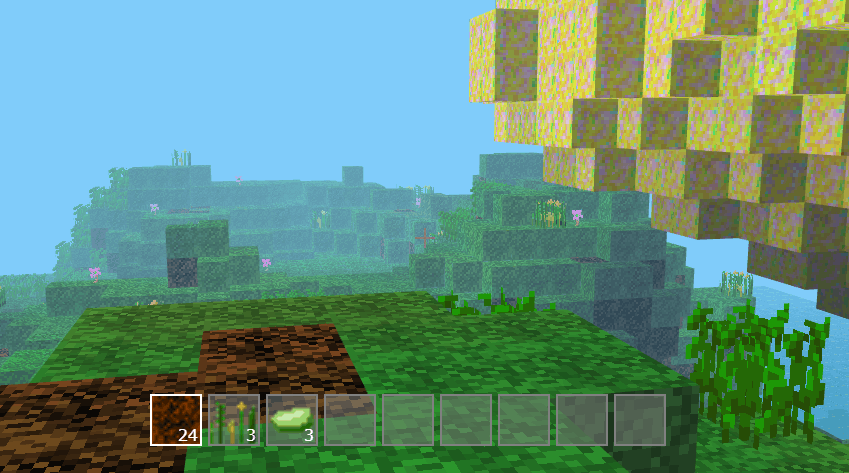
Start by exploring the area near you. You can break blocks of earth, rocks, sand, and other materials to obtain resources. Trees and plants can also provide useful items.
The materials you gather will be stored in your inventory. So, check your inventory regularly to see what you have. If you're missing a material, just keep exploring and searching.
Build Your Own World
Once you have enough materials, you can begin building. A small house, a tall tower, or a uniquely shaped structure can all be created from square blocks.
Try combining different materials to make your construction look better. You can use stone for the base, wood for the walls, and add trees or flowers around. If you don't like the old design, tear it down and rebuild it with a new idea.
Controls
WASD / Arrow keys: Move character
Mouse: Look around and interact
Left mouse: Break or collect blocks
Right mouse button: Place blocks to build
Space: Jump
E: Open inventory
The controls are quite simple, so you can quickly get used to them. Once you're familiar with moving and placing blocks, building will become easier.
Playing Minecraft Clone 3D
Minecraft Clone 3D is suitable for those who like to explore and build freely. There are no bosses or mandatory objectives. You can play slowly, gather resources, and create structures in your own way.
Start your adventure, find your first materials, and see how exciting a world you can create.
Play Minecraft Clone 3D now at https://trolllevel.io.
Popular Games










Discuss Minecraft Clone 3D